
Most agent frameworks give you a loop and hope the model behaves. LangGraph takes the opposite approach: it hands you a graph, and every step in that graph is something you wrote. Nodes do the work, edges decide what happens next, and the state that flows between them can be checkpointed so the agent survives a crash, a restart, or a human saying “wait, let me approve that first.”
This guide walks through what LangGraph actually is, the three building blocks every graph needs, how persistence and human review work, and the four failure modes that show up most often in production.
What LangGraph Is (and What It Is Not)
LangGraph is a low-level orchestration framework and runtime for building, managing, and deploying long-running, stateful agents. The official documentation describes it as focused entirely on agent orchestration: durable execution, streaming, human-in-the-loop, and persistence. It does not abstract your prompts or your architecture.
That low-level positioning matters, because it explains the rest of the ecosystem. LangChain’s agent abstractions are the higher-level way to build a tool-calling loop, and the documentation explicitly recommends starting there if you are new to agents or want a prebuilt architecture. LangSmith sits beside both as the observability platform for tracing, evaluation, and debugging. LangGraph is the piece you reach for when the prebuilt loop is not enough, when you need deterministic steps mixed with model-driven ones, or when the job must survive being interrupted halfway through.
The execution model underneath is Pregel-style message passing. Nodes wait in an inactive state until a message arrives on one of their incoming edges, then run and send updates onward. Nodes that execute in parallel belong to the same super-step; nodes that depend on each other belong to separate ones. The run ends when every node is inactive and no messages are in transit.
The Three Building Blocks: State, Nodes, and Edges
Every LangGraph program is assembled from three components.
State is the shared snapshot of your application at any moment. You define its schema and, optionally, reducer functions that describe how updates from different nodes get merged. The schema can be a TypedDict, a dataclass, or a Pydantic model, and it becomes the input schema for both nodes and edges.
Nodes are functions. They receive the current state, do some work, and return an updated state. A node may call a model, call a tool, or just run ordinary code — there is nothing inherently “AI” about the function itself.
Edges decide what runs next. A fixed edge is a plain transition; a conditional edge is a function that inspects the current state and picks the destination, which is how you build loops that keep going until a condition is met.
You build this with StateGraph, add nodes and edges, then call .compile(). The documentation is emphatic that you must compile before you can run anything, and the reason is practical: compiling validates the structure — catching orphaned nodes — and it is also where you attach runtime arguments such as checkpointers and breakpoints.
Choosing a State Schema
The documented default is a TypedDict. Reach for a dataclass when you want default values in your state, and for a Pydantic BaseModel when you need recursive data validation — though the documentation notes Pydantic is less performant than a TypedDict or dataclass. One practical limitation worth knowing: the higher-level create_agent factory in LangChain does not support Pydantic state schemas.
You are not limited to a single schema either. The graph API supports separate input and output schemas plus private channels for internal node-to-node traffic, and a node can write to any state channel in the graph, not only the ones in its own input schema.
Persistence: Checkpointers and Stores
This is where LangGraph separates itself from a plain agent loop. The persistence layer has two complementary halves, and confusing them is the most common source of confusion in new projects.
| Checkpointer | Store | |
|---|---|---|
| Persists | Graph state snapshots | Application-defined key-value data |
| Scope | One thread | Across threads |
| Memory type | Short-term, thread-scoped | Long-term, cross-thread |
| Use for | Conversation continuity, human review, time travel, fault tolerance | User preferences, facts, shared knowledge |
| Access pattern | Pass a thread_id in the graph config |
Read and write items from nodes |
You attach both at compile time:
graph = builder.compile(checkpointer=checkpointer, store=store)
The thread_id you pass is the pointer to a specific conversation’s state — reuse it to continue a thread, change it to start a fresh one. Most applications use both systems together: the checkpointer tracks the current thread, the store tracks durable facts that outlive it. If you deploy on the Agent Server, the documentation notes that persistence infrastructure is handled automatically and you do not need to configure checkpointers or stores yourself.
Pausing an Agent for Human Approval
Interrupts are how you build a human-in-the-loop workflow. Calling interrupt() inside a node pauses the run at that exact line, saves the graph state through the checkpointer, and waits — indefinitely — for you to resume it.
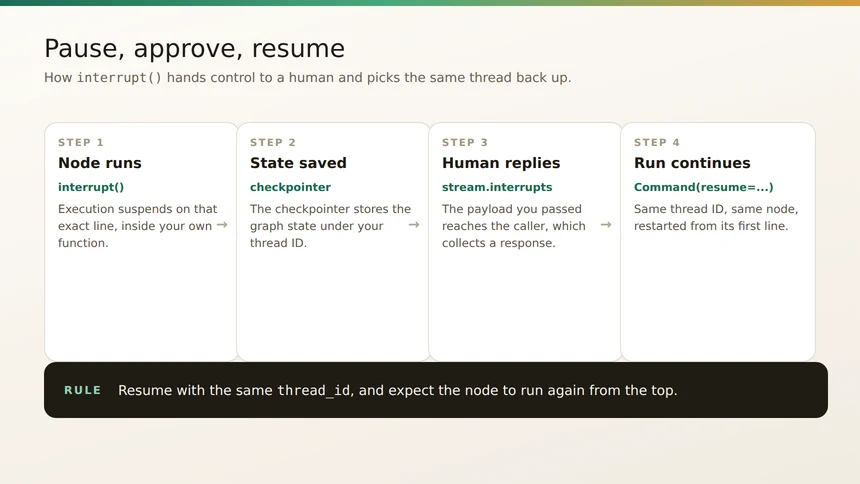
Three things are required: a checkpointer, a thread ID in the config so the runtime knows which state to load, and a JSON-serializable payload so the value can be surfaced to the caller. In event streaming mode, your payload appears on stream.interrupts and stream.interrupted becomes True. With the default invoke() API it surfaces under result["__interrupt__"].
Resuming is a second invocation with Command(resume=...). The resume value becomes the return value of the interrupt() call inside your node. The rules are worth reading twice: you must use the same thread ID that was used when the interrupt fired, and the node restarts from the beginning of the node where the interrupt was called — so any code above that line runs again. The documentation also warns that Command(resume=...) is the only Command pattern intended as input to invoke() and its streaming variants; passing Command(update=...) as input to continue a multi-turn conversation is not supported.
Four Failure Modes to Check First
The persistence documentation lists concrete problems with concrete fixes, and all four are worth knowing before you go hunting.
The thread_id is too long. With PostgresSaver, the thread ID is stored in a column with limited length, and an overlong value produces a database error. Keep IDs under 255 characters, and use a UUID or hash when you need deterministic identifiers.
State vanishes on restart. MemorySaver and InMemorySaver keep checkpoints in RAM, so every checkpoint is lost when the process dies. For production, use PostgresSaver with async support, or SqliteSaver for local file-based development.
Checkpoints grow without bound. Long conversations accumulate checkpoints, which raises both latency and storage cost. Prune old checkpoints periodically or set a retention policy — the documentation suggests a scheduled job that deletes checkpoints older than a set number of days.
A subgraph’s updates do not reach the parent. Each subgraph manages its own checkpoint namespace, so the parent graph may not see the changes immediately. The documented fix is to use shared state via the store for data that must cross graph boundaries, or to configure the subgraph to write to the parent checkpoint.
Once those four are ruled out, most remaining behavior traces back to the graph itself: which node edges point where, whether a conditional edge is choosing the branch you expect, and whether the state your node reads is the state it wrote on the previous super-step. LangGraph’s own recommendation for that last layer of visibility is LangSmith, which traces execution paths and state transitions for you. But the graph you can read is still the fastest way to understand why an agent took the path it took.