
AI voice tools have moved from demos into everyday production work: explainer videos, podcast intros, audiobook samples, and product demos that would normally need a voice actor and studio. ElevenLabs is one of the platforms where a beginner can do this in a browser tab, without writing code. This guide covers what the platform offers, how to get a usable voice on the free tier, how to clone your own voice responsibly, and where the API fits if you want to automate it later.
What ElevenLabs Does and How the Free Plan Works
ElevenLabs is a voice AI platform, and the name understates it if you only look at the homepage. Text to Speech is the feature most people arrive for, but the same account also covers Speech to Text, Voice Design, Sound Effects, Music, and Image generation.
The free plan costs $0 and includes 10,000 credits per month along with Text to Speech, Speech to Text, Sound Effects, Voice Design, Music, Productions, Image generation, and three projects in Studio. That is enough to test a voice and produce short clips for free. The tiers below come from the official ElevenLabs pricing page, checked on October 22, 2026.
| Plan | Price and credits | Notable additions |
|---|---|---|
| Free | $0, 10k credits | Text to Speech, Speech to Text, Sound Effects, Voice Design, 3 Studio projects |
| Starter | $6/month, 30k credits | Commercial license, Instant Voice Cloning, Dubbing Studio, 20 Studio projects |
| Creator | $22/month, 121k credits | Professional Voice Cloning, additional credits |
Two limits are worth knowing before you start. Voice Library voices are not available through the API on the free tier, so if your plan is to build an app, budget for a paid plan early. Separately, the platform’s original Default voices are scheduled to expire on December 31, 2026, so treat any project tied to a specific default voice as something you may need to revisit before then.
Set Up Your Account and Choose the Right Plan
Sign up free and generate a clip before paying for anything. The upgrade decision is mostly about two features: Instant Voice Cloning requires the Starter plan, and Professional Voice Cloning requires the Creator plan or higher. Everything in the Voice Library, Voice Design, Sound Effects, and the Speech to Text tool works on the free tier.
When You Actually Need a Paid Plan
Clone your own voice on Starter, and treat Creator as a deliberate step. Professional Voice Cloning involves a training process and a voice-captcha check that verifies the clone was built from your own samples, so it only makes sense when a voice will be reused regularly.
Keep Your API Key Out of the Project
If you intend to use the API, create a key in the dashboard and store it as a managed secret in an environment variable rather than pasting it into source code. The official quickstart keeps it in an .env file that stays out of version control.
Generate Your First AI Voice in the ElevenLabs Playground
Open the Text to Speech page in the ElevenLabs app and work through this sequence.
- Enter your script. Type or paste text into the input box. Keep the first test to two or three sentences so you can hear every setting change clearly.
- Select a voice. Voices sit at the bottom left of the screen. The Voice Library holds more than 10,000 community voices, plus the curated default voices.
- Select a model. Choose from the current model family. Eleven v4 is the flagship quality option, with a 10,000 character limit and support for 90+ languages; Eleven v3 supports 70+ languages with a 5,000 character limit; Multilingual v2 covers 29 languages and is described as the most stable for long-form generation; Flash v2.5 supports 32 languages with a 40,000 character limit and a lower per-character API price.
- Adjust the settings. Stability, similarity, style, and speaker boost are the main controls, but they matter less than the two choices you just made.
- Click Generate. The result appears as a player you can download or send to a project.
Pick a Voice First, Then a Model
The official documentation is unusually clear about the order of importance: voice selection affects output the most, model selection comes second, and model settings come third. If a result sounds wrong, changing the stability slider will rarely fix it. Switching to a different voice usually will.
Watch the accent. Any voice can speak any language, but it keeps its original accent, so an English voice generating French sounds like French read by an English speaker. For a specific language, use a voice native to it.
Clone Your Own Voice with ElevenLabs Instant Voice Cloning
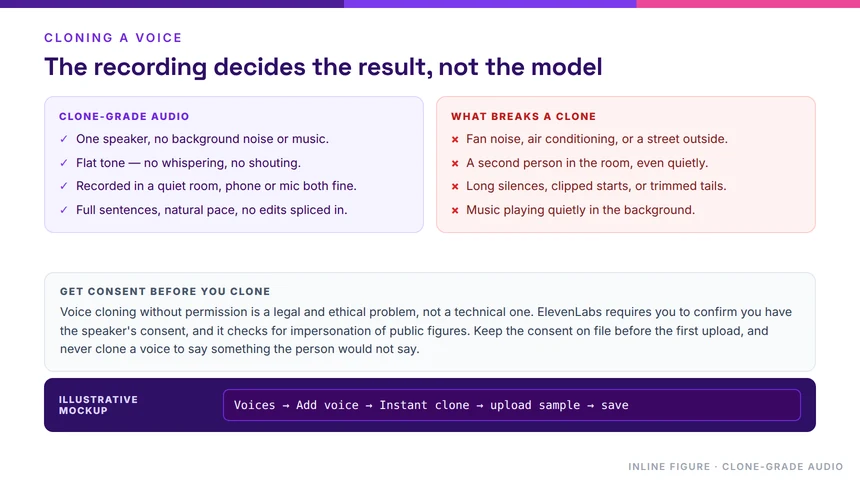
Instant Voice Cloning builds a usable clone from a short sample and starts from the Starter plan. The official product guide routes you through the Voices section of the dashboard.
- Open Voices and click the plus icon. The add-a-voice modal appears.
- Select Instant Voice Clone. Then follow the on-screen prompts to upload an existing file or record directly in the browser.
- Name the voice and confirm you have the right to clone it. The modal asks you to confirm that you own the voice and have consent to clone it, then you click Save voice.
- Open My Voices and click Use voice. The clone is now selectable anywhere you would normally pick a library voice.
Record Clone-Grade Audio
The official recording guidance is worth following, because the model imitates everything it hears, including noise, mouth clicks, and pacing.
- Aim for one to two minutes of clear audio with no reverb or background noise, and avoid going past three minutes, since extra length can hurt the result.
- Use MP3 at 128 kbps or above. Higher bitrates make little difference, because capture quality matters more than codec.
- Target a level between -23 dB and -18 dB RMS with a true peak of -3 dB, so the recording is neither too quiet nor clipping.
- Keep tone and performance consistent across every sample. Wide swings in pitch and volume make the output less predictable.
Get Consent Before You Clone
Only clone a voice you own or one you have explicit permission to use. The ElevenLabs terms of use and safety pages are the right starting points if you are unsure what is permissible. Treat any voice you did not record yourself as off-limits without written permission from the speaker.
Extend Your Workflow with Dubbing, Sound Effects, and the API
Once basic speech generation is comfortable, three related features usually come next.
Dub Existing Video Into Other Languages
Automatic Dubbing translates audio and video across 90+ languages while preserving the emotion, timing, and tone of each speaker, and the original background audio is retained, so you do not have to re-mix the soundtrack.
Upload limits are up to 1 GB and 180 minutes in the app, or 3 GB per source file through the API. A cloning-strength slider from 0 to 10 controls how closely the dubbed voice matches the original, with a default of 7.
Dubbing Studio adds transcript editing, speaker reassignment, and per-clip regeneration, but it is in maintenance mode, accepts files up to 1 GB and 45 minutes, and runs on the older v1 model only.
Add Sound Effects from a Text Prompt
Sound Effects turns a written description into an audio asset, which is useful when you need a transition, a room tone, or a Foley hit without sourcing a library file. The model accepts natural language and audio terminology, including multi-part descriptions such as “footsteps on gravel, then a metallic door opens.”
Each generation is capped at 30 seconds, you can set an explicit duration between 0.1 and 30 seconds, and looping is available for continuous ambience. Output is MP3, with WAV at 48 kHz for non-looping effects.
Make Your First API Call
The quickest route is the ElevenLabs CLI, which walks through account setup, key storage, and SDK installation:
npx -y @elevenlabs/cli@latest onboard initFor a manual setup, install the SDK for your language and read the key from an environment variable:
pip install elevenlabs
pip install python-dotenv
npm install @elevenlabs/elevenlabs-js
npm install dotenvELEVENLABS_API_KEY=your_api_key_hereKeep the real key in the environment file, never in a committed file. The docs also cover streaming, voice cloning, and speech-to-text cookbooks for the next step.
Official Documentation
Every figure and limitation above comes from these official pages, checked on October 22, 2026.
- Pricing and plan tiers
- Text to Speech product guide
- Models and language support
- Voices overview
- Instant Voice Cloning guide
- Dubbing overview
- Sound Effects overview
- API quickstart
Start with the playground on the free tier, learn how voice and model choices affect the result, and only then decide whether Instant or Professional Voice Cloning fits your project. Voice generation rewards iteration: the fastest route to a better result is usually a different voice rather than a different setting.