
Ask a chatbot to describe a photograph, transcribe a meeting recording, or summarize what happens in a video clip, and it does not need a special command. Modern AI models simply accept those inputs alongside text. That ability has a name: multimodal AI, and understanding how it works is the fastest way to get better results from tools you already use.
This guide explains what multimodal actually means, how a picture becomes numbers inside a model, how audio and video are handled differently, and what the practical limits are. No machine learning degree required.
Multimodal, Defined
Text-only models read strings. Multimodal models read more than one modality, meaning a type of information: text, images, audio, video, and sometimes documents or raw data files. The key point is that these inputs end up in the same system. A photo is not handed to a separate tool that writes a caption and passes that caption along. The image and your question are processed together, so the answer can depend on both.
That distinction matters in practice. If you upload a screenshot of a spreadsheet and ask what went wrong, a true multimodal model can reason about the numbers and your question in one pass. A pipeline that captions first and answers second loses detail, because the caption was written before anyone knew which detail mattered.
Most current flagship models are multimodal by default, and many API models accept images with a few lines of extra code. Anthropic’s documentation describes sending images as image content blocks, OpenAI’s API guide uses input_image parts, and Mistral’s vision documentation accepts either a hosted URL or a base64-encoded image in the Chat Completions API. The vocabulary differs, the capability is the same.
How a Model Turns a Photo Into Tokens
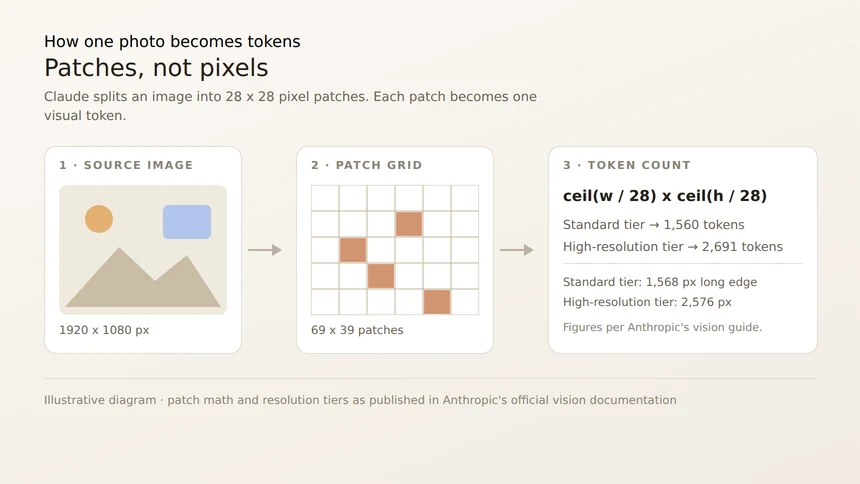
Models do not look at images the way people do. An image is converted into a grid of small patches, and each patch becomes a “visual token” that the language model processes like a chunk of text. Anthropic documents the arithmetic precisely: each patch is a 28 by 28 pixel block, so an image costs roughly the ceiling of width divided by 28, multiplied by the ceiling of height divided by 28.
What the same photo costs at different sizes
| Image size | Standard tier | High-resolution tier |
|---|---|---|
| 1000 x 1000 px | 1,296 tokens | 1,296 tokens |
| 1920 x 1080 px | 1,560 tokens | 2,691 tokens |
| 3840 x 2160 px | 1,560 tokens (downsized) | 4,784 tokens (downsized) |
Two limits come out of this. Anthropic’s standard tier caps the long edge at 1,568 pixels and 1,568 visual tokens, while its high-resolution tier, available on Claude 4.7 and later models, allows a 2,576 pixel long edge and 4,784 visual tokens. Anything larger is downscaled before processing. The practical lesson is simple: send the smallest image that still holds the detail you care about, because a downscaled screenshot means the model is literally working from fewer pixels.
OpenAI’s API takes a different route to the same idea with a detail setting on each image: low, high, original, or auto. Under the current vision model family, a low-detail image is fitted within 512 by 512 pixels, while high detail allows up to 2,500 patches and a maximum dimension of 65,535 pixels. Use low detail for a quick scan of many images, and high or original when you need to read small text, code, or fine print.
Three ways to hand a model an image
Anthropic’s API accepts images in three forms: a base64-encoded image embedded directly in the request body, a URL reference to an image hosted online, or a file_id returned by the Files API when you plan to reuse the same upload across many requests. On Amazon Bedrock and Google Cloud, only base64 sources are currently available. OpenAI’s API takes an input_image part with an image_url or a file_id, and Mistral documents the same two-option split of URL or base64.
Two details are worth memorizing. First, order. Anthropic explicitly recommends putting images before your question, mirroring the long-context advice for documents: Claude works best when images come before text, and images placed after or mixed into the text still work but usually work worse. Second, labeling. When you send several images at once, Anthropic’s documentation suggests tagging them in the prompt as “Image 1:”, “Image 2:”, and so on, so you can refer to them by name in follow-up turns.
File limits are generous but real. Anthropic allows up to 600 images per request, with a maximum of 10 MB per image when base64-encoded through the Claude API and 5 MB on Amazon Bedrock and Google Cloud; request size limits of 32 MB on standard endpoints can be reached first. OpenAI’s guide lists PNG, JPEG, WEBP, and non-animated GIF as supported inputs, up to 512 MB of total payload per request and up to 1,500 images per request. Anthropic supports JPEG, PNG, GIF, and WebP, and notes that animated images are unsupported, with only the first frame used.
Audio and Video: Sampling Instead of Pixels
Audio and video are handled by sampling rather than by patching an image grid, but the same principle applies: the file is converted into a stream of tokens the language model can reason over.
Google’s Gemini documentation for audio understanding lists a maximum audio length of roughly 8.4 hours, or up to one million tokens per prompt, with one audio file per prompt and formats including AAC, FLAC, MP3, M4A, OGG, PCM, WAV, and WEBM. The documented use cases are summarization, transcription, and translation. Gemini’s video documentation adds that by default one frame per second is sampled, with timestamps added every second, and that references to specific moments use an MM:SS format at that sampling rate. A prompt can carry up to ten videos, with a maximum length of roughly 45 minutes for video with audio and about an hour without.
Because video is sampled, the model is not watching a continuous film. It is looking at a storyboard of still frames plus whatever audio track was provided. That is why asking about a fast-moving event, a subtle gesture, or text that appears for a fraction of a second often disappoints: the frame may not exist in the samples the model receives. Custom frame rate sampling and clip intervals are available when the detail matters.
Where Multimodal AI Works, and Where It Fails
Multimodal models are strongest on tasks that mix a clear visual or spoken signal with a question. Mistral’s vision documentation lists the practical uses they see customers running: understanding charts, comparing images, transcribing and running OCR on old documents, and pulling structured data out of a screenshot. Anthropic’s vision guide points to coordinate-based workflows, where the model returns the position of an object in the frame so a program can click, drag, or highlight it.
Failure modes follow the same pattern as text. Small or blurry text can be misread. A chart with unusual axes may be interpreted incorrectly. Counts of many similar objects are unreliable. And because the model can describe a picture fluently, a confidently wrong description is more dangerous than an obviously bad one, which is why verifying extracted figures against the source image matters.
A Practical First Workflow
Try this sequence the next time you want an AI to work with a photo, a clip, or a recording.
One, crop before you upload. Resize to the region that matters. A tight, readable crop is both cheaper in tokens and more accurate than a full-resolution page.
Two, state the task. “Transcribe the table” and “Summarize this page” produce very different results from “Describe this image.”
Three, put the image first. Follow Anthropic’s image-then-text order, then ask your question in plain language.
Four, ask about uncertainty. Add a line such as “if any text is unreadable, say so instead of guessing,” and check the parts that matter most.
Five, keep the original. Multimodal output is a draft, not a source of truth. Compare numbers and names against the file before they travel further.
Once you have tried a single image, the same pattern extends naturally. Audio and video follow the identical recipe: give the model the file, state the task, place the media before the question, and verify what comes back. That is the whole of multimodal AI, minus the mathematics.