
Every developer who has worked with OpenAI, Anthropic, or any major AI API in production has hit a 429 error. Rate limits exist because inference is expensive — a single request can cost anywhere from $0.002 to $0.06, and a runaway loop can burn through months of budget in minutes. This guide covers what rate limits actually are, how to diagnose which one you’ve hit, and a practical toolkit for handling them without crashing your application.
Understanding What Rate Limits Actually Are
A 429 response from an AI API is not a single type of error. There are at least three distinct limits that can trigger it, and treating them all the same way will either break your app or cost you money.
Request rate limits cap how many API calls you can make per minute or per day, regardless of content size. This is the most common limit and the one most developers first encounter.
Token limits cap the total volume of tokens — input plus output — that you can send within a time window. You can stay under your request limit and still hit your token limit if each call carries a large context.
Concurrency limits cap how many requests can be in flight simultaneously. This is the least understood limit because it doesn’t show up in daily or per-minute stats — it triggers when parallel requests pile up faster than the API can process them.
When you receive a 429, the response body or headers usually tell you which limit you hit. Read the error carefully before deciding on a fix.
Retry Strategies That Actually Work
The standard response to a 429 is to retry the request. But not all retry strategies are equal.
Exponential Backoff with Jitter
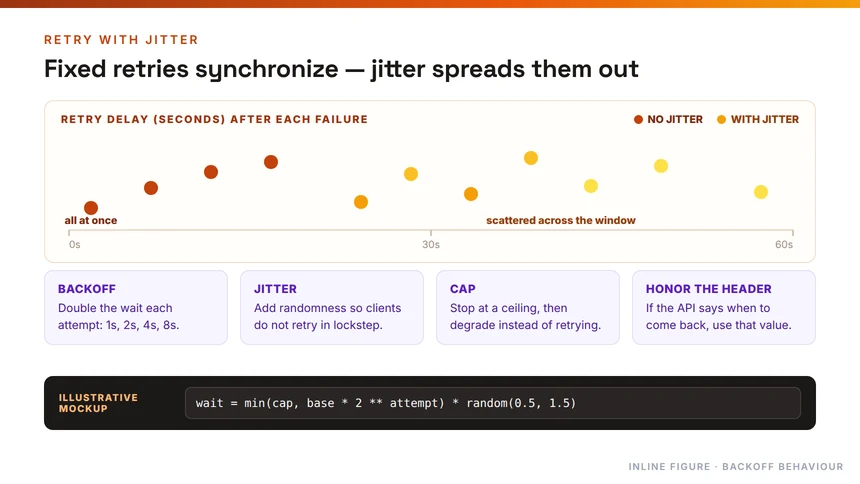
The correct retry pattern is exponential backoff with full jitter. Here is how it works in practice:
Attempt 1: wait 1 second plus a random value between 0 and 1 second, so 1.0 to 2.0 seconds total.
Attempt 2: wait 2 seconds plus random jitter, so 2.0 to 4.0 seconds.
Attempt 3: wait 4 seconds plus jitter, so 4.0 to 8.0 seconds.
Attempt 4: wait 8 seconds plus jitter, so 8.0 to 16.0 seconds.
Attempt 5: wait 16 seconds plus jitter, so 16.0 to 32.0 seconds.
Cap retries at 5 attempts, then fail with a clear error.
The jitter matters because without it, 1,000 clients that all get rate-limited at the same time will retry in lockstep — all at 1 second, all at 2 seconds, creating synchronized spikes that immediately re-saturate the API. Random jitter spreads retries across the wait interval, dramatically reducing thundering herd problems.
Using the Retry-After Header
Many AI APIs return a Retry-After header with a 429 response. This value tells you exactly when the API expects capacity to free up. When this header is present, use it instead of calculating your own backoff — the server knows its own capacity better than any client-side heuristic.
Proactive Strategies to Avoid Hitting Limits
Retries are reactive. Better engineers build systems that avoid 429 errors in the first place.
Token Bucket vs Fixed Window
If you are building the rate limiter on your side — or choosing an API gateway — understanding the difference between token bucket and fixed window algorithms matters.
Fixed window counts requests within a set time window, say 60 requests per minute. The problem is the boundary spike: a user can send 60 requests at 11:59:59 and another 60 at 12:00:01, hitting 120 requests in 2 seconds without violating the per-minute count.
Token bucket is the industry standard for AI APIs. Each user gets a bucket of tokens that refills at a fixed rate — say 60 tokens per minute, with a burst capacity of 10. Users can send up to 10 requests immediately, then sustain 1 request per second. This smooths traffic and is how Stripe, AWS, and OpenAI handle their rate limiting.
For AI APIs specifically, token bucket is almost always the right choice.
Concurrency Control
Concurrency limits are easier to prevent than to fix. Use a semaphore or a worker pool to cap how many requests are in flight at any moment. If your application fans out many parallel sub-tasks, queue the work and drain it at a controlled pace rather than firing everything simultaneously.
Reducing Token Consumption
Every call you eliminate is a limit you never approach. Several strategies reduce token usage without reducing quality:
Batch independent items into a single request where the API supports it. Cache results for repeated or deterministic queries. Prune conversation history so each call carries fewer tokens. Route simple steps to smaller, cheaper models that often have higher rate limits, reserving your largest model only for steps that genuinely need it.
Tier-Based Limits and Cost-Based Billing
If you are on a paid plan, understand your tier’s limits before you ship. Most AI API providers define limits per pricing tier:
Free tier typically allows 3 to 60 requests per minute with shared infrastructure. Pro tier might allow 500 to 5,000 requests per minute with priority queuing and higher burst capacity. Enterprise tier allows 50,000 or more requests per minute with dedicated infrastructure and custom limits.
Some providers also offer cost-based limits rather than request-based limits. Instead of counting all requests equally, they assign weights — a simple GET request costs 1 point, while a complex AI generation request costs 50 points. Your hourly budget is expressed in points rather than calls. This prevents a single client from exhausting expensive inference resources while staying within a raw request count.
Handling Concurrency Limits Specifically
Concurrency limits trigger differently from rate limits. They fire not because you’ve sent too many requests in a minute, but because too many are active simultaneously. The fix is not to space out retries — it is to reduce parallelism.
If you are running parallel AI tasks — for example, generating summaries for 20 documents simultaneously — a concurrency limit will fire once the API receives more in-flight requests than it can handle. The solution is a worker pool that drains at a controlled rate, not a retry loop.
Track your own concurrency locally so you can throttle before the API rejects you. Discovering the limit through a 429 is slower and more expensive than proactive throttling.
Degrading Gracefully When Limits Persist
Sometimes capacity genuinely is not available within a reasonable window. In these cases, design your application to degrade rather than crash.
Return partial results where possible. Queue tasks for later processing rather than failing immediately. Surface a clear, honest message to the user instead of a raw error code.
For long-running agents, persist in-progress state so that a task can resume after a cooldown rather than restarting from scratch. This matters most for multi-step agents where re-running everything is expensive.
What to Check First When You See a 429
Before adding any retry logic or architectural change, log the exact error and the relevant headers so you know which type of limit triggered. The correct remedy differs for each:
A token-per-minute ceiling is solved by trimming prompts or spacing calls. A request count limit is solved by retrying with backoff. A concurrency limit is solved by reducing parallelism, not by shortening text. Applying the wrong fix wastes time and creates new problems.
Summary
Rate limits are a fact of life with AI APIs. The practical toolkit is straightforward: exponential backoff with jitter for reactive retries, a token bucket strategy for proactive limiting, concurrency control for parallel workloads, and graceful degradation for persistent failures. The common thread across all of these is understanding which limit you are actually hitting — because the fix for a token limit is completely different from the fix for a concurrency limit.
Start with the basics: log your errors carefully, honor the Retry-After header, and build systems that queue rather than fire. Most 429 problems in production are not API problems — they are architecture problems with straightforward fixes.