
Haiku 5.5 is Anthropic’s new lightweight model built for high‑volume API workloads. It brings larger context, adaptive thinking, drastically reduced pricing, yet also introduces breaking API changes that will break existing code migrated directly from Haiku 4.5.
This walkthrough covers key improvements, migration pitfalls, practical Python patterns for classification‑extraction, and the popular sub‑agent orchestration pattern, plus guidance on when you still need Sonnet or Opus.
Core upgrades from Haiku 4.5
Haiku 5.5 raises many hard limits while reshaping how reasoning works inside the model. ‑ 1 million‑token context window, up from 200 K tokens ‑ Max output raised to 128 K tokens ‑ Adaptive thinking controlled via the effort parameter; manual thinking‑budget tokens removed ‑ Sharp price reduction: $0.10 / $0.50 per million input/output for prompts ≤100 K tokens ‑ Smaller minimum cacheable prompt size (512 tokens), improving prompt‑cache hit rates ‑ Major benchmark gains across knowledge work, computer‑use and agent‑coding tasks
One critical nuance: it ships with an updated tokenizer. Identical source text will expand to roughly 30 % more tokens compared to Haiku 4.5. After tokenizer adjustments, real‑world average cost saving lands around 75 %, not the advertised 90 % list‑price drop.
Breaking API changes you must fix before migration
This is the most common source of production failures when upgrading existing projects. Several parameters from Haiku 4.5 will throw 400 errors if you leave them in request payloads.
‑ Remove temperature, top_p, top_k completely from your API calls. Haiku 5.5 does not accept custom sampling parameters. ‑ Drop manual budget_tokens for thinking; reasoning depth is now managed by effort. ‑ Discontinue assistant prefill at message‑array end, this payload pattern returns errors.
Two behavioural shifts to handle in application logic:
- Adaptive thinking is enabled by default. Responses may contain explicit thinking blocks, and thinking tokens consume your
max_tokensquota. Your parser must iterate over content blocks instead of simply reading the full response as plain text. - Safety refusals return
stop_reason: "refusal". Your code needs explicit error handling for refusal outcomes instead of assuming valid JSON output every time.
Suitable scenarios & where you should not use Haiku 5.5
Haiku 5.5 shines for narrow, repetitive high‑volume jobs: message classification, document‑field extraction, bulk summarisation, data compaction, and acting as a parallel‑running worker sub‑agent under a heavier lead model.
It is not the best fit for complex multi‑step agent coding, deep creative reasoning, or high‑stakes complex planning. For those tasks keep Sonnet 5.5 or Opus 5.5 in your stack.
Practical pattern one: classification and structured extraction
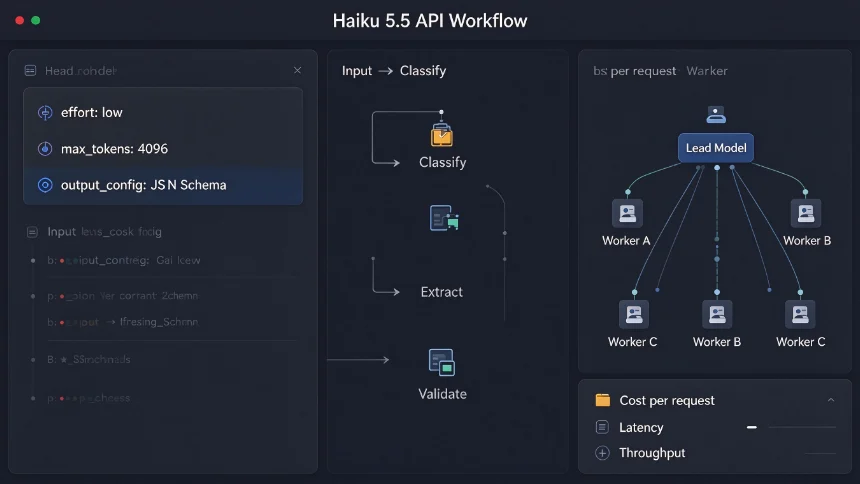
For bulk classification and field extraction, use the native JSON‑schema constrained output_config. Avoid manual prompt‑based JSON description whenever possible, it improves output reliability.
Key implementation notes: ‑ Set effort="low" for simple structured tasks to cut token overhead. ‑ Reserve enough max_tokens, because adaptive‑thinking tokens count against this ceiling. ‑ Parse response by iterating content blocks, skip thinking‑type blocks and assemble only text‑type blocks. ‑ Catch stop_reason values of refusal and max_tokens as explicit failure states.
When you run on Amazon Bedrock, JSON‑schema constrained output config is unavailable. In that environment you describe schema inside system prompts and validate returned JSON in‑code.
Practical pattern two: sub‑agent worker‑lead orchestration
The most interesting real‑world usage pattern for Haiku 5.5 is sub‑agent orchestration.
The architecture works like this:
- A heavier lead model (Sonnet 5.5 / Opus 5.5) holds overall task context, makes high‑level decisions and composes the final deliverable.
- Many parallel Haiku 5.5 worker instances execute narrow, repetitive subtasks such as document summarisation, field parsing or filtering.
- Workers return condensed intermediate results back to the lead model. The lead never ingests full‑length source documents, cutting total token consumption drastically.
Use semaphores inside async code to cap concurrent worker count and stay within platform rate‑limits. Measure both worker‑side cost and lead‑model cost separately, so you understand your real total expense.
Practical pattern three: benchmark before committing to production
Do not rely purely on published benchmark sheets. Run your own offline smoke‑test suite with real production traffic samples. Compare Haiku 5.5 against Sonnet 5.5 and Opus 5.5, measure three metrics: task accuracy, median latency and per‑request cost.
Only promote Haiku 5.5 into production workloads when accuracy meets your business bar. Keep the ability to fall‑back to larger models for inputs where lightweight outputs degrade.
Cost pitfalls to watch
‑ There is a pricing cliff above 100 K input tokens: unit price jumps significantly once your prompt crosses this threshold. Design workflows to avoid crossing that boundary at scale. ‑ Remember tokenizer inflation: same text creates more tokens than Haiku 4.5. Re‑calculate your expected monthly API spend instead of directly re‑using old cost projections. ‑ Always count thinking tokens into cost estimation, they are billed as regular output tokens.
Once you understand its hard limits and breaking‑change list, Haiku 5.5 becomes a very powerful tool for scaling repetitive AI processing. Many teams adopt the worker‑lead sub‑agent setup: offload all mechanical heavy‑volume grunt‑work to Haiku, and reserve expensive large‑model cycles for high‑level judgement and final synthesis.